

The typical adult types around 40 words per minute on a physical keyboard, with cleaned datasets putting the median closer to 41.6 WPM once outliers are stripped out. Mobile typing runs slower, averaging in the mid-30s. If you're hitting 60 WPM or more, you're already ahead of most casual typists and creeping into the range where speed stops being your bottleneck and accuracy starts mattering more.
TL;DR:
- Typing 60 WPM or higher on a full keyboard puts you above most casual typists and signals a shift from speed to accuracy as your main challenge.
- The median typing speed is around 44 to 46 WPM, with only a small percentage of testers reaching 100 WPM or more, which places them in the top 1 percent.
- Device choice matters: average speeds are about 51.56 WPM on computers but only 36.2 WPM on mobile, largely due to autocorrect lag and smaller targets.
- Testing under real-world conditions—using common words, longer durations, and considering error correction—provides a more reliable benchmark than short or disorganized tests.
- Building speed should prioritize accuracy first, with consistent practice on proper finger placement and specific letter transitions, especially for those aiming for elite speeds.
Table of Contents
- Typing Speed Average by the Numbers
- How Do Typing Percentiles Actually Work?
- Typing Speed Averages by Age and Profession
- How to Get a Reliable Typing Speed Benchmark
- Drills That Actually Raise Your Typing Speed
- What Should You Actually Prioritize With Your Typing Speed?
- Track Your Typing Speed With Real Percentile Feedback
- Where These Typing Speed Benchmarks Come From
- Sources
- FAQ
Typing Speed Average by the Numbers
Large aggregated test pools tend to agree on a rough shape even when the exact figures shift. The global average typing speed sits near 40 WPM, with a cleaned median around 41.6 WPM once duplicate and abandoned tests get filtered out. Office workers who type for a living tend to land higher, and professional typists or transcriptionists often average a notably higher range than casual typists.
Device matters more than most people expect. The 2018 CHI keystroke study, one of the largest of its kind, measured average speeds of 51.56 WPM on computer keyboards across more than 168,000 volunteers, compared to just 36.2 WPM on mobile devices from over 37,000 participants. That's not a small gap. Touchscreens introduce autocorrect lag, smaller target zones, and thumb fatigue that a full keyboard simply doesn't have.
Here's how the numbers typically break down:
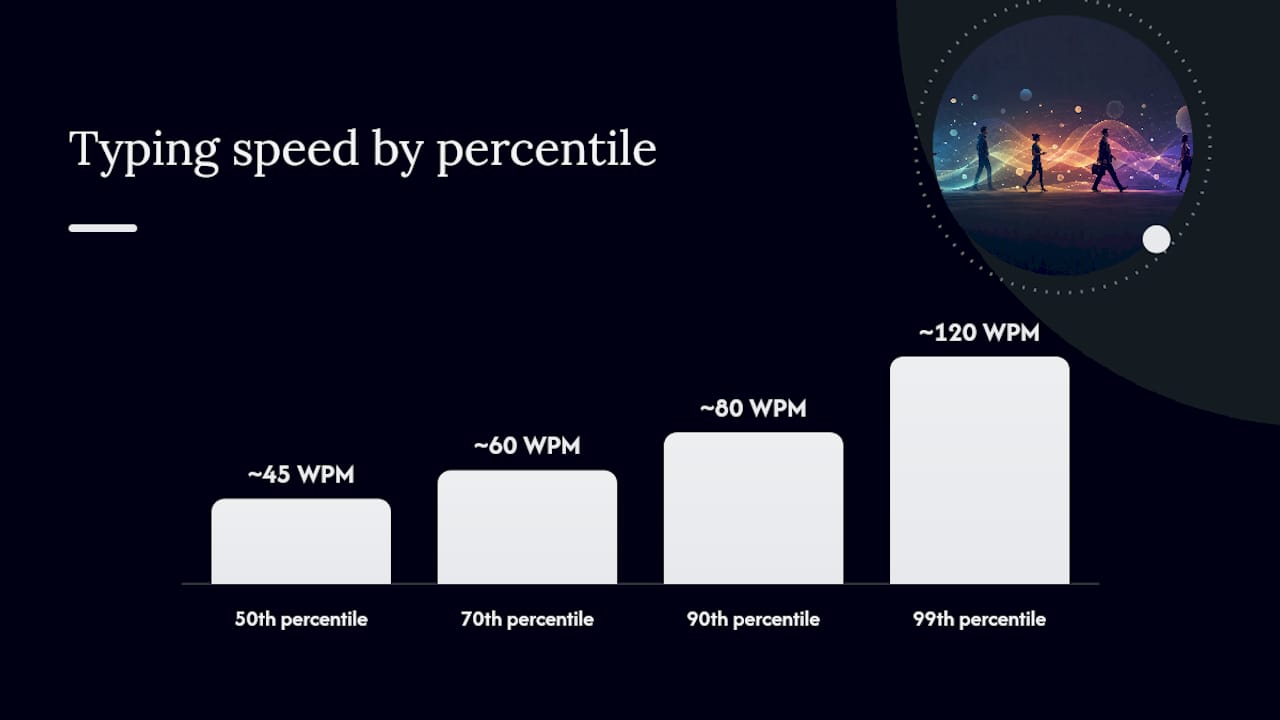
- Median speed: roughly 44 to 46 WPM across large test samples
- 70th percentile: around 60 WPM
- 90th percentile: around 80 WPM
- 99th percentile: around 120 WPM
- Mobile average: approximately 36.2 WPM, with a higher rate of uncorrected errors than desktop typing
Quick benchmark: if you're typing 40 WPM on a full keyboard, you're sitting close to the middle of the pack. Cross 60 WPM and you're outperforming most casual typists. Professional-grade speed generally starts around 65 to 70 WPM with strong accuracy attached.
How Do Typing Percentiles Actually Work?
A percentile tells you what share of typists you're faster than, not just your raw score. It sounds simple, but the number gets more meaningful (and more brutal) the further right you move on the curve.
Here's what the climb looks like based on aggregated percentile data:
- 50th percentile (median): around 44 to 46 WPM. This is your average office worker typing an email without much urgency.
- 70th percentile: around 60 WPM. Common among people who type daily for work, like customer service reps or students who write a lot of essays.
- 90th percentile: around 80 WPM. This is genuinely fast, and it usually reflects years of regular touch-typing practice.
- 99th percentile: around 120 WPM. Extremely rare, and typically limited to competitive typists, stenographers, or people who've trained specifically for speed.
Testing conditions shift where you land more than people realize. A test using common English words scores higher than one full of random characters or technical jargon, because your fingers pattern-match familiar sequences faster. Test length matters too. A 15 second burst inflates your peak speed, while a 5 minute passage exposes fatigue and reveals your real sustainable pace.
Hitting 100 WPM or higher puts you in a genuinely small group. According to percentile mapping data, that territory sits near the 99th percentile, meaning fewer than 1 in 100 typists tested reach it. Most people who claim triple-digit speeds casually are either measuring short bursts or rounding generously.
Typing Speed Averages by Age and Profession
Age and job type both shape typing speed, but not always in the direction people assume. Teenagers who grew up texting often type quickly on phones but haven't necessarily built strong touch-typing habits on a full keyboard. Older adults sometimes show the opposite pattern: slower peak speed but higher accuracy from decades of keyboard familiarity.
| Age group | Typical median WPM |
|---|---|
| 30 to 40 | 30 to 40 |
| 40 to 50 | 40 to 50 |
| 45 to 50 | 45 to 50 |
| 36 to 50 | 40 to 50 |
| 51 and older | 35 to 45 |
Profession changes the picture even more than age does. A few common benchmarks:
- Data entry clerks: often 60 to 80 WPM, since the job is built entirely around volume and repetition.
- Transcriptionists: typically 70 to 90 WPM with high accuracy demands, since a missed word can change meaning.
- Programmers: frequently average lower raw WPM (40 to 60) because code isn't natural language and involves constant pausing to think.
- Customer support and administrative staff: usually 45 to 65 WPM, balancing speed with the need to write clearly under time pressure.
- Writers and journalists: vary widely, often 50 to 70 WPM, since composing original thought slows typing regardless of raw finger speed.
Peer-reviewed research on typing performance documents that age, device familiarity, and language proficiency all correlate with both speed and error rate. That's the real explanation behind the spread in the table above. It's not just muscle memory. It's how much of your daily routine already runs through a keyboard, and whether your job rewards raw speed or careful accuracy.
How to Get a Reliable Typing Speed Benchmark
Most people test once, get a number, and either feel great or feel discouraged. Neither reaction means much, because a single test is noisy. Here's a better process.
- Choose a proper test first. Look for one that runs at least 60 seconds, uses real words rather than random characters, and clearly explains how it counts errors. Short 10 second tests inflate your peak and hide fatigue.
- Run it three times, not once. Take the median of your three scores, not the highest. Your best run is usually a fluke; your median is your actual working speed.
- Separate desktop from mobile results. Since mobile typing runs roughly 30% slower than desktop typing on average, comparing a phone score to a keyboard benchmark will always make you look slower than you are.
- Factor in your correction tax. Every backspace costs time. If you're typing fast but sloppy, your gross WPM might look impressive while your net WPM (after error correction) tells the real story.
- Weigh speed against your actual job needs. A legal transcriptionist needs near-perfect accuracy even at moderate speed. A chat support agent benefits more from raw speed since customers forgive minor typos.
Pro Tip: Always check whether a test reports "gross WPM" or "net WPM." Gross counts every keystroke you typed, errors included. Net subtracts a penalty for mistakes. The same test run can show two very different numbers depending on which one is displayed, so compare like with like.
Testing yourself on a tool like Testuno's typing speed test gives you an instant percentile comparison, which removes the guesswork of figuring out where a raw WPM number actually places you.
Drills That Actually Raise Your Typing Speed
Speed without accuracy is a trap. Chasing WPM before you've locked in correct finger placement just bakes bad habits in faster. The better order is: accuracy first, speed second, and stamina third.
- Master home row before anything else. If your fingers still hover and hunt, no amount of speed drilling will fix that. Spend the first week just building muscle memory for finger placement.
- Practice in short, frequent sessions. Fifteen minutes daily beats a single two-hour weekend session. Consistency builds the muscle memory that speed depends on.
- Drill your weak letter combinations specifically. Most people have two or three finger transitions (like "qu" or "ing") that consistently slow them down. Isolate those and repeat them until they're automatic.
- Use timed transcription practice. Type along with a paragraph of real prose against a clock. It mimics real-world typing far better than random word generators.
- Adjust your ergonomics. Wrist position, chair height, and keyboard angle all affect sustainable speed. A cramped setup caps your ceiling no matter how much you practice.
Research on typing technique backs this up in an interesting way. Vanderbilt researchers found that self-taught typists can type nearly as fast as formally trained touch-typists, as long as they can see the keyboard while typing. That's a real challenge to the old assumption that you need classic touch-typing form to be fast. Technique matters less than consistent, focused practice.
If you're a student trying to build better study habits alongside typing speed, pairing deliberate practice routines with broader study strategies tends to compound results faster than drilling typing in isolation.
What Should You Actually Prioritize With Your Typing Speed?
Most people ask "how do I type faster" when the real question is "faster for what." If you're a student typing essays, accuracy and sustainable pace over 20 to 30 minutes matter more than a flashy 15 second burst. If you're chasing a transcription or data entry job, both speed and accuracy carry weight, and the job posting usually tells you the exact WPM threshold you need to clear.
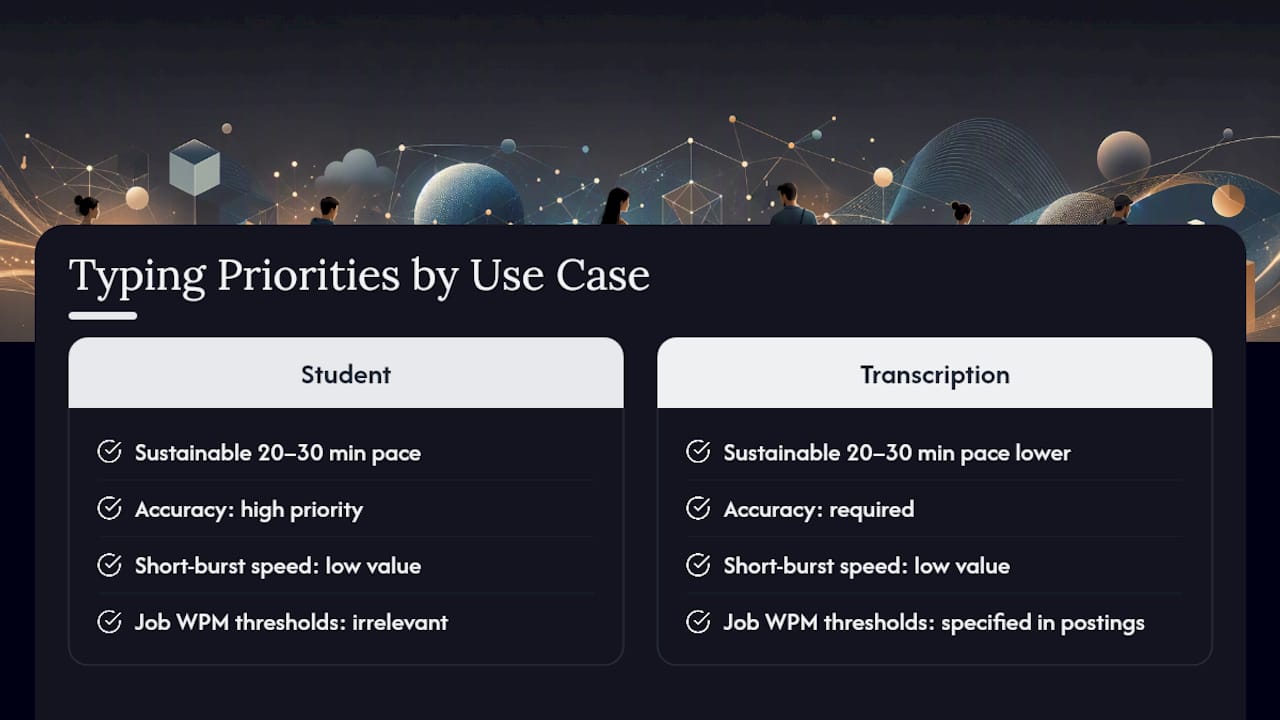
A reasonable rule: don't invest in dedicated speed training until your accuracy sits above 95% at your current pace. Speed built on sloppy accuracy just creates more correction work later, which cancels out the gain.
Track your median WPM monthly rather than daily. Daily fluctuation is mostly noise from fatigue and distraction, and a realistic improvement pace is 5 to 10 WPM every few months of consistent practice.
— Steve
Track Your Typing Speed With Real Percentile Feedback
An online typing speed test can give you an instant WPM score alongside a percentile ranking, so you know exactly how your result compares to other typists rather than guessing against a generic online average. Many such tests require no sign-up and take just a couple of minutes to complete.

Since a single test run is never fully reliable, take the Testuno typing speed test three times this week, record your median score, and check back weekly to see how your accuracy and speed shift with practice. If you're curious how your typing speed connects to broader cognitive performance, Testuno's processing speed test and reading speed test round out the picture.
Where These Typing Speed Benchmarks Come From
The figures in this article draw from several large-scale sources rather than a single survey. The Average Typing Speed by Age, Job & Country data set aggregates millions of test results to establish the global average and median. The Keys&Type analysis of the 2018 CHI study provides the large-sample computer-versus-mobile comparison, drawn from over 200,000 combined volunteers. The Typing Speed Percentile Chart supplies the percentile-to-WPM mapping used throughout this piece. For the academic angle on age, device, and error-rate correlation, the PMC peer-reviewed article on typing performance offers the underlying research. Wikipedia's Words per minute entry rounds out the methodological context.
Sources
Every typing speed average you'll find online comes from a slightly different sample, and that's the real reason the numbers don't always match. Most large datasets rely on volunteers who chose to take a typing test online. That group skews toward people who already type often and care about the result, which pulls the reported average higher than the true general population.
Device and methodology compound the gap. A Wikipedia summary of typing measurement conventions notes mobile averages around 36.2 WPM with roughly 2.3% uncorrected error rates, figures that shift depending on whether a study counts gross or net speed.
What this means for you as a reader:
- Average Typing Speed by Age, Job & Country 2026 Global Data
- Average Typing Speed in Words Per Minute · Keys&Type
- Typing Speed Percentile Chart: Are You in the Top 10?
- Observations on typing and related performance (PMC)
FAQ
Is Typing at 120 WPM Fast?
Yes, extremely. A speed of 120 WPM sits around the 99th percentile of tested typists, meaning fewer than 1 in 100 people reach that pace. That range is typical of competitive typists and professional stenographers, not casual daily typists.
How Rare Is It to Type 100 WPM?
Reaching 100 WPM is uncommon and puts you well above the 90th percentile, which itself sits around 80 WPM according to aggregated percentile data. Most people who sustain 100 WPM over a full test, not just a short burst, have years of dedicated touch-typing practice behind them.
Is Typing 40 WPM Good?
Forty WPM is right around the global average, so it's solidly average rather than particularly good or bad. It's a fine baseline for casual computer use but falls short of the 65 to 70 WPM range professional typists typically need.
Is 30 WPM Typing Speed Good?
Thirty WPM is below the global average of around 40 WPM and sits closer to typical mobile typing speeds or beginner-level desktop typing. It's a reasonable starting point if you're new to touch-typing, and consistent daily practice with accuracy-first drills can typically push that number up by 5 to 10 WPM within a few months. If you want a clear starting benchmark, Testuno's typing speed test gives you an instant score and percentile without requiring sign-up.